
How Refill Products I've Ordered
Refilling your products in the Handcraft Health Patient Portal is simple and convenient. Follow these steps to check your refills and place an order.
Step 1: Access Your Refills
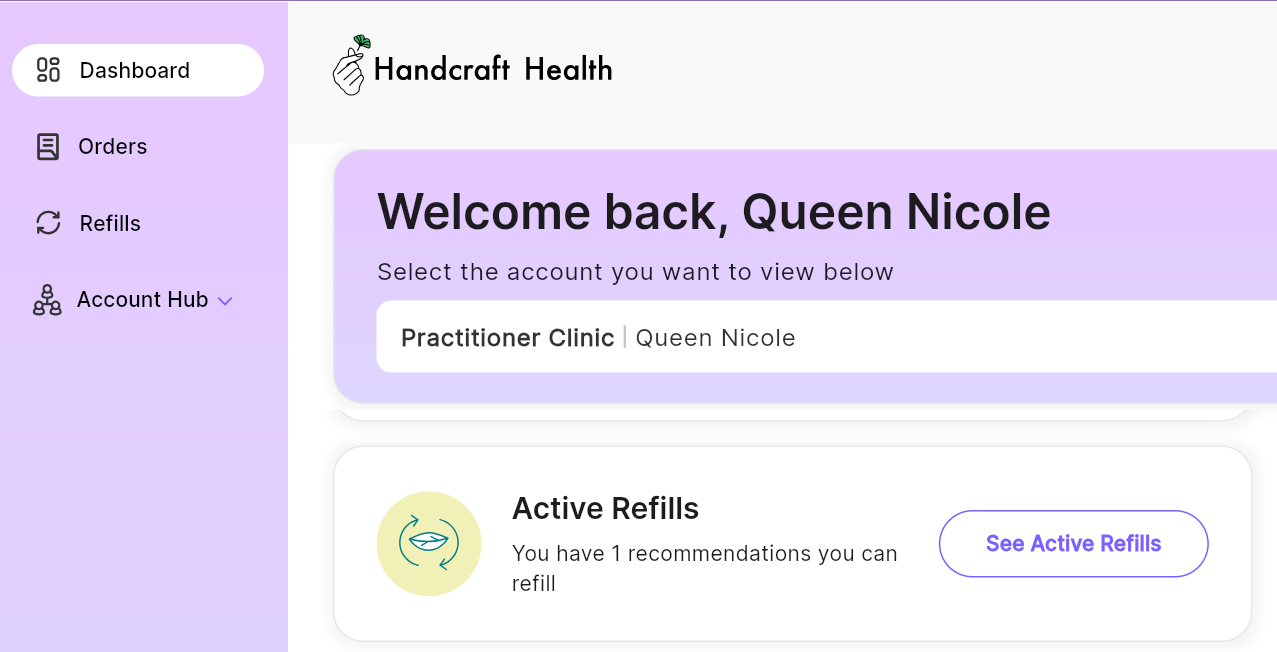
Log into your Handcraft Health Patient Portal and go to your dashboard. There are two ways to view your refills:
- Click See Active Refills under the Active Refills section.
-
Click Refills in the left-hand menu.
Step 2: Locate Your Product
Once in the refills section, find the product you want to refill.
- Active Refills: If a refill is available, it will appear under the Active tab.
- Expired or Fulfilled Refills: If the refill is expired or already fulfilled, go to the Expired tab and send a refill request to your practitioner.

Step 3: Add to Cart
If you have an active refill, click Add to Cart to place your refill order. Once added, the product will be in your cart, which appears at the top of your dashboard as a shopping cart icon.
- If you’re ready to complete the refill, click Continue.
- If not, your refill will stay in the cart, and you can return anytime to complete the checkout process.

Step 4: Confirm & Complete Payment
After clicking Continue a new tab will open and confirm;
- Confirm your items
- Shipping address
- Then proceed with checkout with Apple Pay, Google Pay or enter your card manually.
Once payment is processed, we will begin preparing your order for delivery. By following these steps, you can easily manage your refills and ensure your products arrive on time. If you have any questions or need assistance, feel free to contact support at support@handcraft.health!